
Sherweb
Overview
The Sherweb integration gives Bumblebee read access to your Sherweb Partner Portal data — customers, platforms, subscriptions, receivable charges, and payable charges — so your AI agents can answer questions about who you bill, what you owe, and what you've sold across Microsoft, Acronis, Dropbox, Veeam, and other Sherweb-distributed platforms.
Prerequisites & Setup
Before setting up the Sherweb integration, you need:
- An active Sherweb Partner account
- Administrator access to the Sherweb Partner Portal
- Permission to manage API keys under Security > APIs
Step 1: Open the API Keys page
- Sign in to the Sherweb Partner Portal
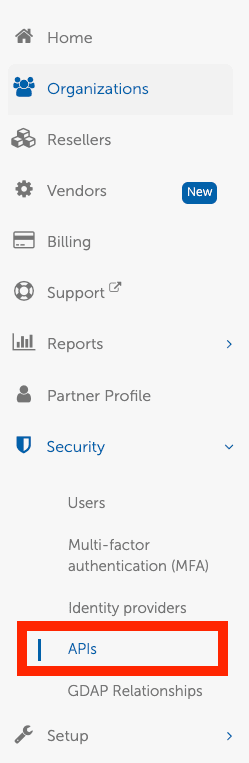
- In the left sidebar, expand Security and click APIs
Step 2: Create a new API key
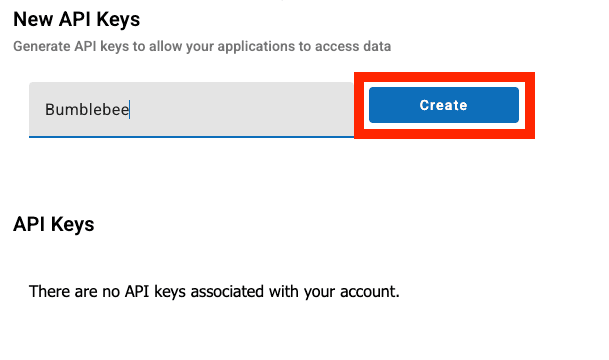
- Under New API Keys, enter an application name (e.g.
Bumblebee) for your own reference - Click Create
Step 3: Copy and save the credentials
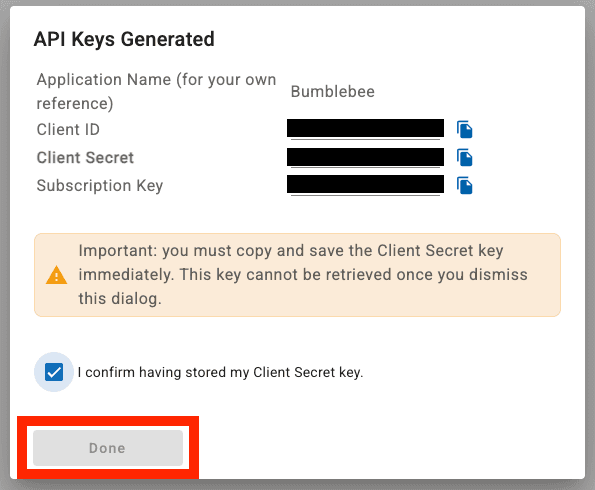
Sherweb will generate three credentials at once: Client ID, Client Secret, and Subscription Key.
- Copy each value to a safe location — the Client Secret is shown only once and cannot be retrieved later
- Tick I confirm having stored my Client Secret key
- Click Done
If you lose the Client Secret, you'll need to delete the key and create a new one. The Client ID and Subscription Key remain visible on the API Keys list after the dialog is dismissed.
Step 4: Verify the API key
After dismissing the dialog, your new key appears in the API Keys list with its Client ID and Subscription Key, the creation timestamp, and an Active status.

Step 5: Configure in Bumblebee
- Go to the Integrations page in Bumblebee
- Click Sherweb
- Enter your Client ID, Client Secret, and Subscription Key
- Click Save Configuration
Bumblebee handles the OAuth2 client-credentials token flow automatically and refreshes tokens before they expire — no manual token management required.
Available Tools
Sherweb is exposed through a single thin HTTP wrapper that lets the agent call any documented endpoint across the Distributor and Service Provider APIs.
Request
- send_request — Call any Sherweb Distributor or Service Provider endpoint. Required: endpoint (str). Optional: method (str, default
GET), params (dict), data (dict)
The agent picks the right endpoint and parameters based on your question. Common reads include:
- Customers —
/service-provider/v1/customers - Platforms —
/service-provider/v1/platforms(Microsoft, Acronis, Dropbox, Veeam, SentinelOne, ...) - Subscriptions —
/service-provider/v1/billing/subscriptions/details?customerId={id} - Receivable charges —
/service-provider/v1/billing/receivable-charges?customerId={id}(what your customers owe you) - Payable charges —
/distributor/v1/billing/payable-charges(what you owe Sherweb) - Customer catalog & pricing —
/service-provider/v1/customer-catalogs/... - Order / amendment tracking —
/service-provider/v1/tracking/{trackingId}