
ConnectWise
Overview
The ConnectWise integration enables seamless automation between Bumblebee and ConnectWise Manage (formerly ConnectWise PSA). Automate service tickets, opportunities, companies, contacts, projects, and more across your business operations.
Prerequisites & Setup
Before setting up the ConnectWise integration, you need:
- An active ConnectWise Manage account
- API Member credentials (Company ID, Public Key, Private Key)
- API access enabled in your ConnectWise instance
- A security role for the API member. We recommend read-only access: use the row-level permissions below, with Inquire Level set to All and Add, Edit, and Delete left at None.
Create API Member in ConnectWise
- Log in to ConnectWise Manage
- Navigate to System > Members > API Members
- Click New to create a new API Member
- Configure the following:
- API Member ID: Unique identifier for the API user
- Public Key: Will be auto-generated
- Private Key: Will be auto-generated (save this securely)
- Security Role: Assign the recommended read-only role described below
- Note your Company ID (found in System > Company Information)
- Note your Server URL — the host you log in to, taken from the browser
address bar (e.g.,
na.myconnectwise.net). Enter the host only; Bumblebee appends the API path (/v4_6_release/apis/3.0) for you.
You do not need a Client ID from the ConnectWise developer portal — Bumblebee sends its own.
Recommended Security Role Permissions
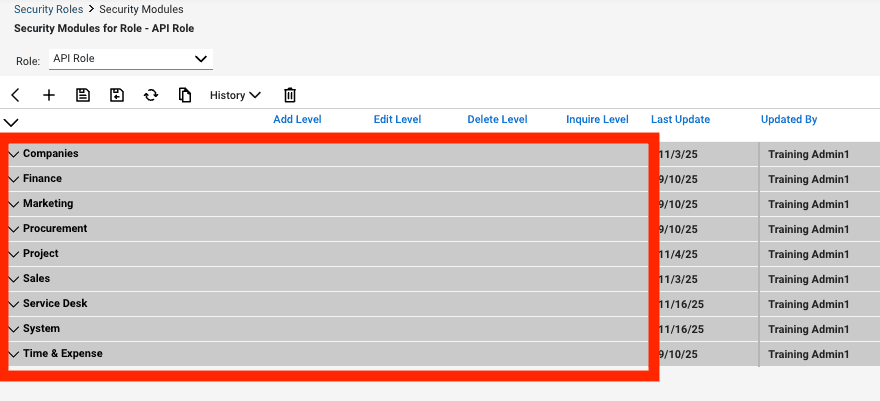
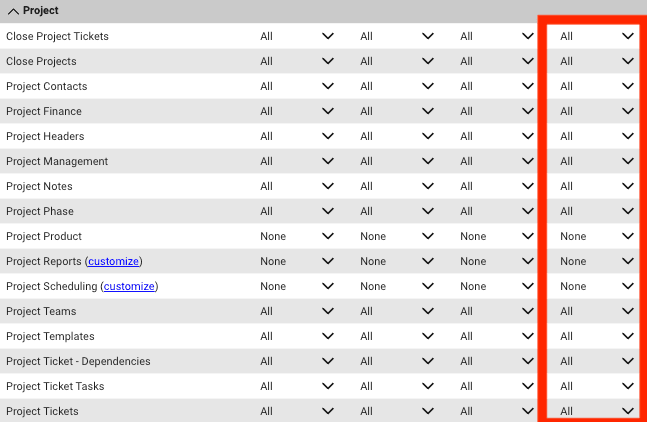
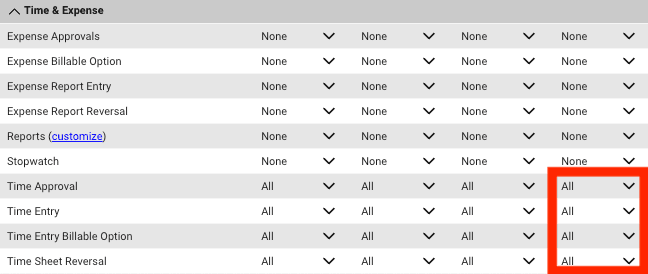
In System > Security Roles, create a role for Bumblebee and open its Security Modules. Leave every Add, Edit, and Delete level at None. Set Inquire Level to All only for the rows listed below; leave unlisted rows at None.
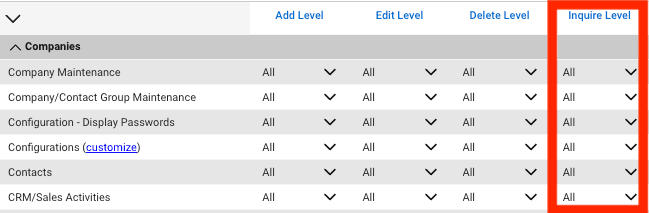
Companies
Set Inquire Level to All for Company Maintenance, Company/Contact Group Maintenance, Configuration - Display Passwords, Configurations, Contacts, and CRM/Sales Activities.
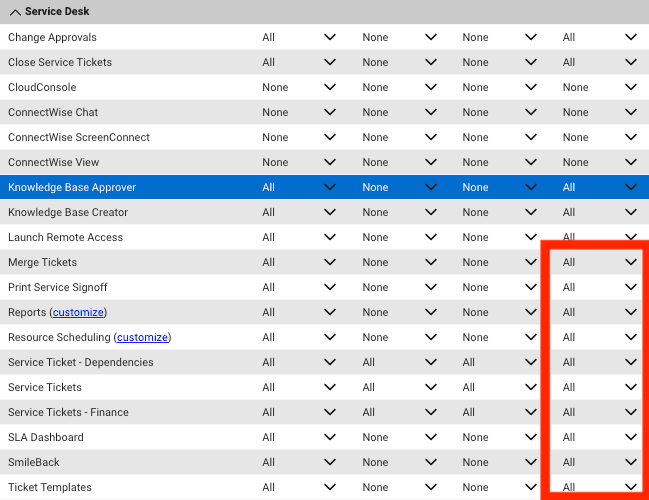
Service Desk
Set Inquire Level to All for Merge Tickets, Print Service Signoff, Reports, Resource Scheduling, Service Ticket - Dependencies, Service Tickets, Service Tickets - Finance, SLA Dashboard, SmileBack, and Ticket Templates.
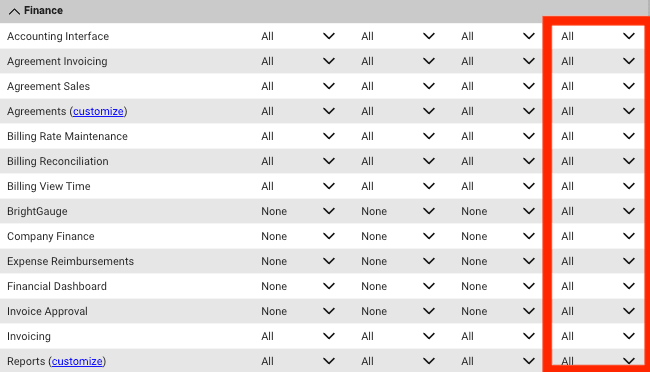
Finance
Set Inquire Level to All for every row shown in the screenshot.
Project
Set Inquire Level to All for every row shown except Project Product, Project Reports, and Project Scheduling. Leave those three rows at None.
Time & Expense
Set Inquire Level to All for Time Approval, Time Entry, Time Entry Billable Option, and Time Sheet Reversal. Leave the other displayed rows at None.
Configure in Bumblebee
- Navigate to the Integrations page
- Select ConnectWise
- Enter your credentials:
- Company ID
- Public Key
- Private Key
- Server URL
- Click Test Connection
- Save the configuration
Available Tools
Service Tickets
- get_ticket - Get complete ticket information by ticket ID. Returns raw JSON response from ConnectWise API. Required: ticket_id (int)
- list_tickets - List tickets. Returns raw JSON response from ConnectWise API. Optional: company_id (int), board_name (str), status_name (str), priority_name (str), max_records (int)
- create_ticket - Create a new service ticket in ConnectWise. Returns the created ticket as raw JSON. Required: summary (str), company_id (int), board_id (int). Optional: priority_id (int), status_id (int), initial_description (str), contact_name (str), contact_phone_number (str), contact_email_address (str)
- update_ticket - Update an existing service ticket in ConnectWise. Returns the updated ticket as raw JSON. Required: ticket_id (int). Optional: summary (str), priority_id (int), status_id (int), type_id (int), subtype_id (int), item_id (int), impact (str), sla_id (int), initial_description (str), contact_name (str), contact_phone_number (str), contact_email_address (str)
- list_ticket_notes - Get all notes/comments for a ticket including ticket notes, time entry notes, and meeting notes. Required: ticket_id (int). Optional: max_records (int)
- post_ticket_note - Create a new note/comment on a service ticket. Required: ticket_id (int), text (str). Optional: internal_flag (bool), external_flag (bool), detail_description_flag (bool), internal_analysis_flag (bool), resolution_flag (bool)
Companies
- get_company - Get complete company information by company ID. Returns raw JSON response from ConnectWise API. Required: company_id (int)
- list_companies - List companies with optional filters. Optional: name (str), identifier (str), status_name (str), max_records (int)
- create_company - Create a new company in ConnectWise. Returns the created company as raw JSON. Required: name (str), identifier (str). Optional: address_line1 (str), address_line2 (str), city (str), state (str), zip (str), phone_number (str), fax_number (str), website (str)
- update_company - Update an existing company in ConnectWise. Returns the updated company as raw JSON. Required: company_id (int). Optional: name (str), phone_number (str), fax_number (str), website (str), address_line1 (str), address_line2 (str), city (str), state (str), zip (str)
Contacts
- get_contact - Get complete contact information by contact ID. Returns raw JSON response from ConnectWise API. Required: contact_id (int)
- list_contacts - List contacts with optional filters. Optional: company_id (int), first_name (str), last_name (str), max_records (int)
- create_contact - Create a new contact in ConnectWise. Returns the created contact as raw JSON. Required: first_name (str), last_name (str), company_id (int). Optional: title (str), address_line1 (str), address_line2 (str), city (str), state (str), zip (str)
- update_contact - Update an existing contact in ConnectWise. Returns the updated contact as raw JSON. Required: contact_id (int). Optional: first_name (str), last_name (str), title (str), address_line1 (str), address_line2 (str), city (str), state (str), zip (str)
Opportunities
- get_opportunity - Get complete opportunity information by opportunity ID. Returns raw JSON response from ConnectWise API. Required: opportunity_id (int)
- list_opportunities - List opportunities with optional filters. Optional: company_id (int), status_name (str), max_records (int)
- create_opportunity - Create a new sales opportunity in ConnectWise. Returns the created opportunity as raw JSON. Required: name (str), primary_sales_rep_id (int), company_id (int), contact_id (int). Optional: expected_close_date (str), notes (str), source (str)
- update_opportunity - Update an existing sales opportunity in ConnectWise. Returns the updated opportunity as raw JSON. Required: opportunity_id (int). Optional: name (str), expected_close_date (str), notes (str), source (str)
Projects
- get_project - Get complete project information by project ID. Returns raw JSON response from ConnectWise API. Required: project_id (int)
- list_projects - List projects with optional filters. Optional: company_id (int), status_name (str), max_records (int)
- create_project - Create a new project in ConnectWise. Returns the created project as raw JSON. Required: name (str), company_id (int), board_id (int), billing_method (str), estimated_start (str), estimated_end (str). Optional: description (str)
- update_project - Update an existing project in ConnectWise. Returns the updated project as raw JSON. Required: project_id (int). Optional: name (str), description (str), estimated_start (str), estimated_end (str)
Service Boards & Configuration
- list_service_boards - List service boards with optional filters. Optional: name (str), max_records (int)
- get_service_board_details - Get complete service board configuration details including types, subtypes, items, statuses, and teams. Required: board_id (int)
- get_service_ticket_configuration - Get service ticket configuration including priorities, impacts, and SLAs.
Callbacks (Webhooks)
- list_callbacks - List all callback entries (webhooks) with pagination. Returns raw JSON array response from ConnectWise API.
- create_callback - Create a new callback entry (webhook) in ConnectWise. Returns the created callback as raw JSON. Required: url (str), type (str), level (str), object_id (int). Optional: description (str), inactive_flag (bool), member_id (int)
- update_callback - Update an existing callback entry (webhook) in ConnectWise. Returns the updated callback as raw JSON. Required: callback_id (int). Optional: url (str), description (str), inactive_flag (bool), object_id (int), type (str), level (str)
- delete_callback - Delete a callback entry (webhook) from ConnectWise. Required: callback_id (int)
Finance - Agreements
- get_agreement - Get complete agreement details by ID from ConnectWise Finance module. Required: agreement_id (int)
- list_agreements - List agreements from ConnectWise Finance module. Optional: company_id (int), agreement_status (str), max_records (int)
- get_agreement_additions - List additions (line items) for a specific agreement. Required: agreement_id (int). Optional: max_records (int)
- get_agreement_adjustments - List adjustments (credits/debits) for a specific agreement. Required: agreement_id (int). Optional: max_records (int)
Finance - Invoices
- get_invoice - Get complete invoice details by ID from ConnectWise Finance module. Required: invoice_id (int)
- list_invoices - List invoices from ConnectWise Finance module. Optional: company_id (int), agreement_id (int), max_records (int)
- get_invoice_payments - List payments applied to a specific invoice. Required: invoice_id (int). Optional: max_records (int)