
SaaS Alerts
Overview
The SaaS Alerts integration connects Bumblebee with Kaseya SaaS Alerts, a security monitoring platform for SaaS applications. Query security events, alerts, and threat detections across your managed Microsoft 365 and Google Workspace tenants directly from your workflows.
Prerequisites & Setup
Before setting up the SaaS Alerts integration, you need:
- A SaaS Alerts account with API access
- Your API Key from the SaaS Alerts portal
SaaS Alerts authenticates with a single API Key. Copy it as soon as it is shown — it is hidden again the moment you navigate away from the API page.
Step 1: Reveal Your API Credentials
- In the SaaS Alerts portal, go to Settings in the left sidebar and open the API tab
- Under Manage API, check Agree to the API Policy
- Click Show Api Key to reveal your key
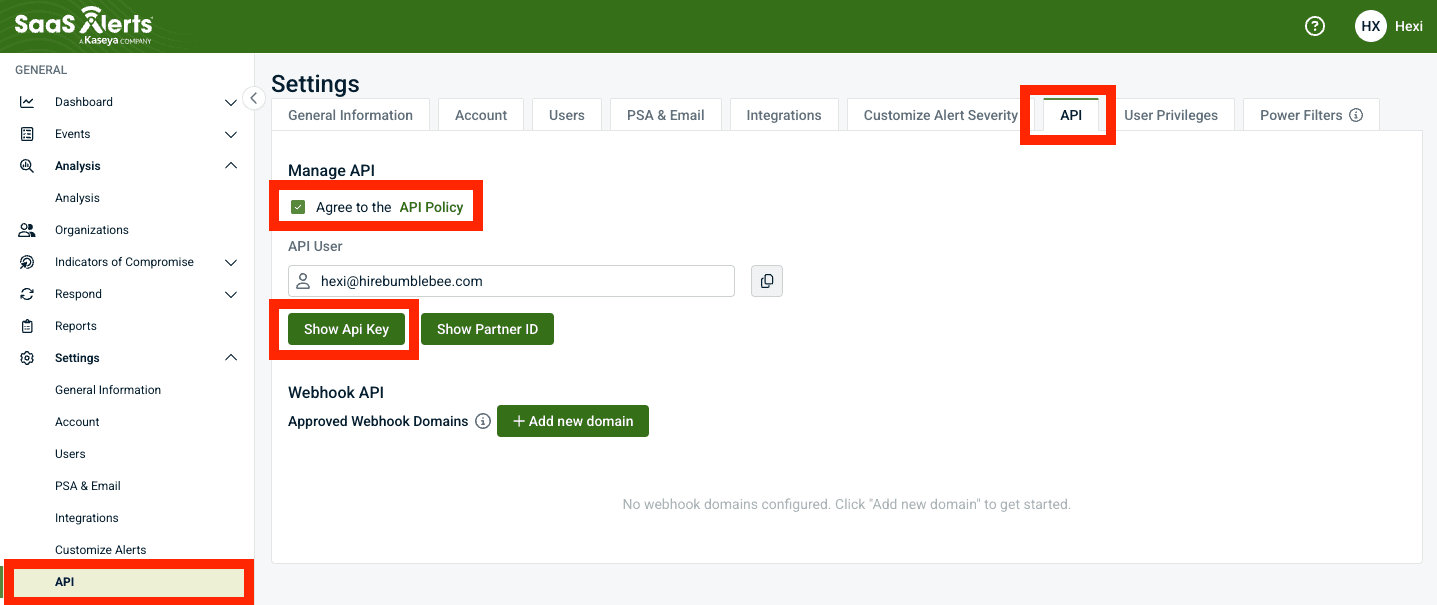
Step 2: Copy the API Key
- Copy the revealed API Key
- Store it somewhere safe
The API Key is shown only once. As soon as you navigate away from the API page it is hidden again — if you lose it, return to Settings → API and reveal it again.
Step 3: Configure in Bumblebee
- Go to the Integrations page in Bumblebee
- Click SaaS Alerts
- Enter your API Key
- Click Save Configuration
Available Tools
Reporting (4 tools, read-only)
- get_partner_resource — One lookup tool for partner-scope resources. Required: resource (str):
profile,msp_user,partner_users,billing_dates,billing_details, oralert_recommended_actions. Optional: billing_date (str,yyyy-mm-dd, required forbilling_details). - list_customers_and_users — The customer directory and per-customer monitored SaaS users. Optional: resource (str,
customersdefault orusers), customer_id (str, required forusers). - search_events — Search or count security events with structured filters. Optional: customer_id, user_email, alert_status (
low/medium/critical), event_type, start, end, from_position (int), size (int), time_sort (asc/desc), count_only (bool). - query_events — Raw Elasticsearch DSL over the event stream, including server-side aggregations (counts by severity, event type, customer, or user; date histograms for trends). Required: query_body (object with
query, optionalaggs,sort,size).
All tools accept an optional response_filter (JMESPath) to project large responses down to the fields you need.
Typical reporting flows: enumerate customers, then aggregate events per customer by severity with query_events; pull critical alerts for a period with search_events; and attach SaaS Alerts' own recommended remediation per event type from get_partner_resource(resource="alert_recommended_actions").
RocketCyber
Connect Bumblebee with RocketCyber (Kaseya) to query managed SOC data — agents, incidents, events, firewalls, and Defender posture across accounts
ScalePad
Connect Bumblebee with ScalePad for read-only hardware inventory, purchase dates, warranty and coverage, contract and opportunity data, Quoter quotes and catalog, plus ControlMap compliance posture