
Autotask
Overview
The Autotask integration allows you to automate your Professional Services Automation workflows directly from Bumblebee. Manage tickets, companies, contacts, and projects without manual intervention.
Prerequisites & Setup
Before setting up the Autotask integration, ensure you have:
- An active Autotask account with API access enabled
- API credentials (Username and API Key)
- A custom API-only security level copied from API User (system) and configured with the recommended access below.
Configure the Recommended Security Level
In Admin > Account Settings & Users > Resources/Users (HR) > Security Levels, find API User (system) (API-only). In some Autotask versions, Account Settings & Users is named Organization Settings & Users.
Copy the system level, name the copy something clear such as Bumblebee API Read Only, and open its Feature/Section Access settings. The system level provides full API access and cannot be edited directly.
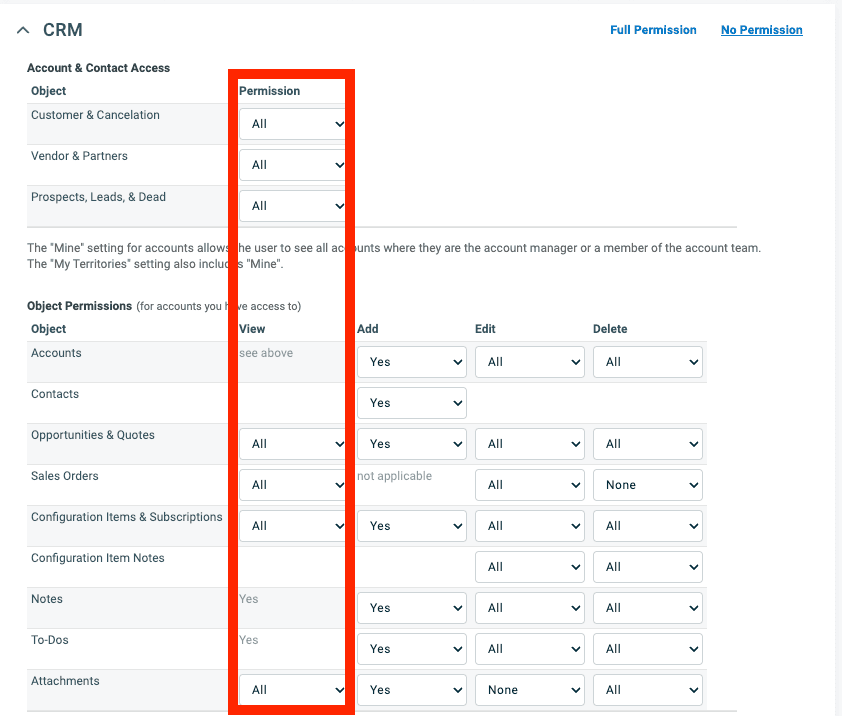
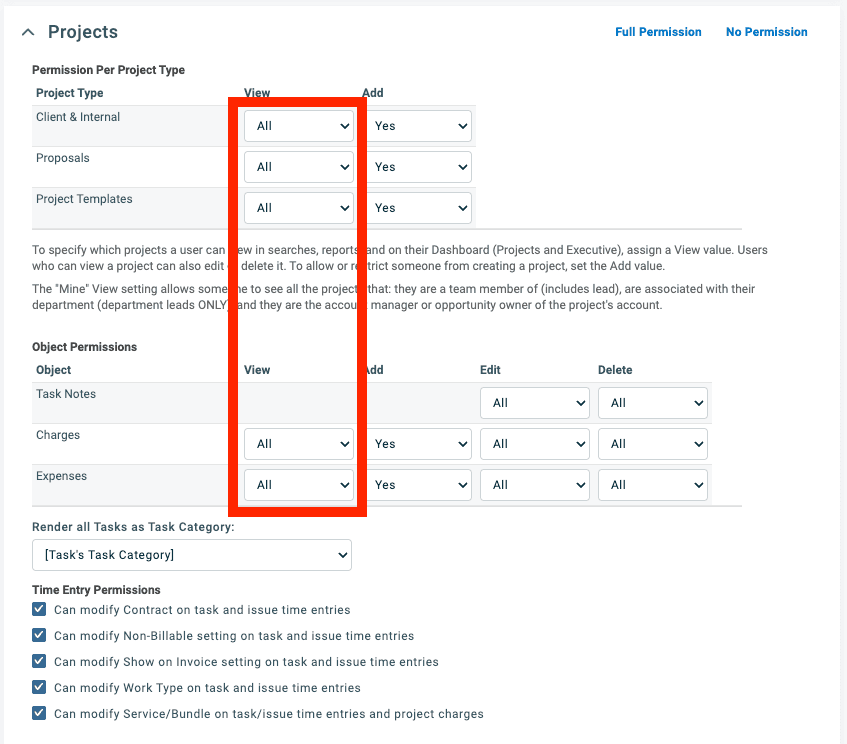
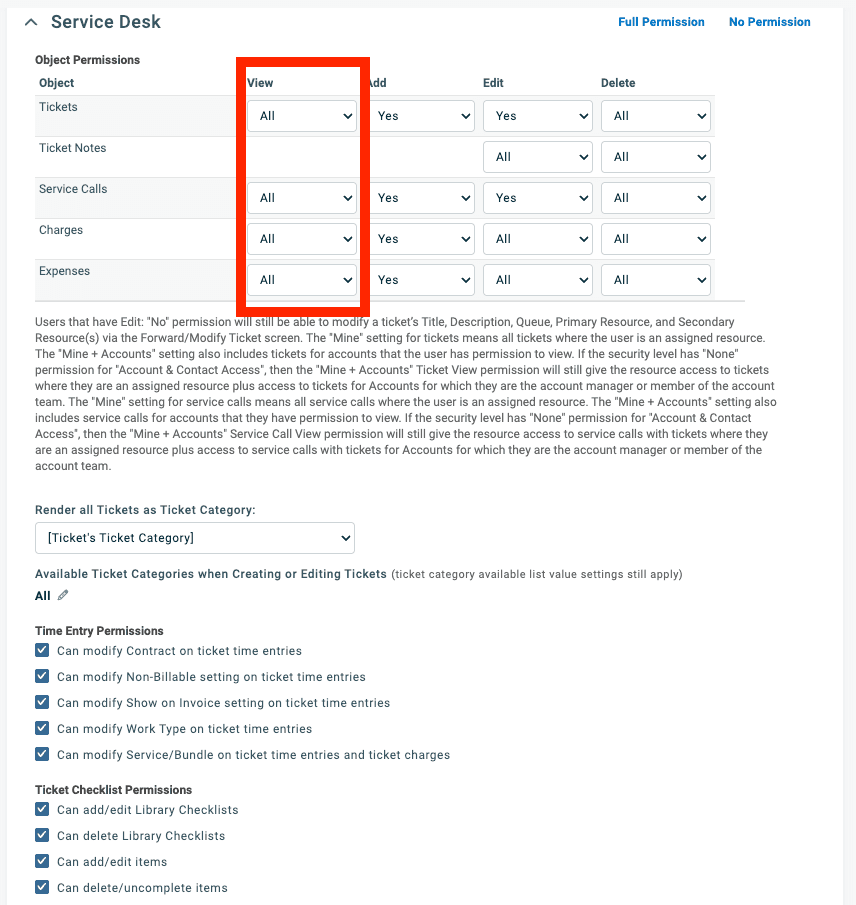
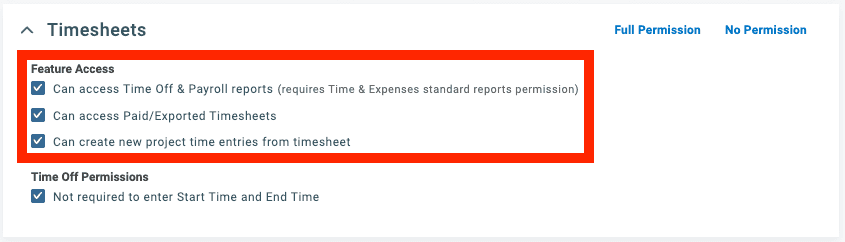
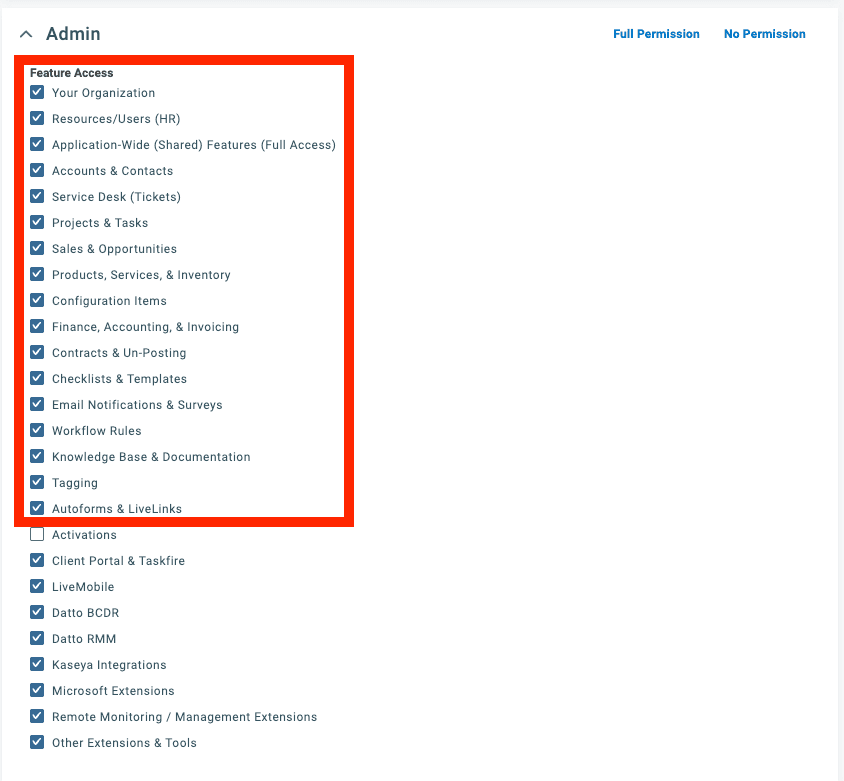
Only the red-outlined controls in the screenshots below are part of the recommended access. Other Add, Edit, Delete, or Full Permission values visible in the screenshots are not required; grant those only for Bumblebee write actions you intend to use.
CRM
Set the highlighted Account & Contact Access permissions and selectable View permissions to All.
Projects
Set View to All for Client & Internal, Proposals, Project Templates, Charges, and Expenses.
Service Desk
Set View to All for Tickets, Service Calls, Charges, and Expenses.
Timesheets
Enable the three highlighted Feature Access options for reports, paid or exported timesheets, and project time entries.
Admin
Enable the highlighted Feature Access options from Your Organization through Autoforms & LiveLinks.
Obtain API Credentials
-
Log in to your Autotask account
-
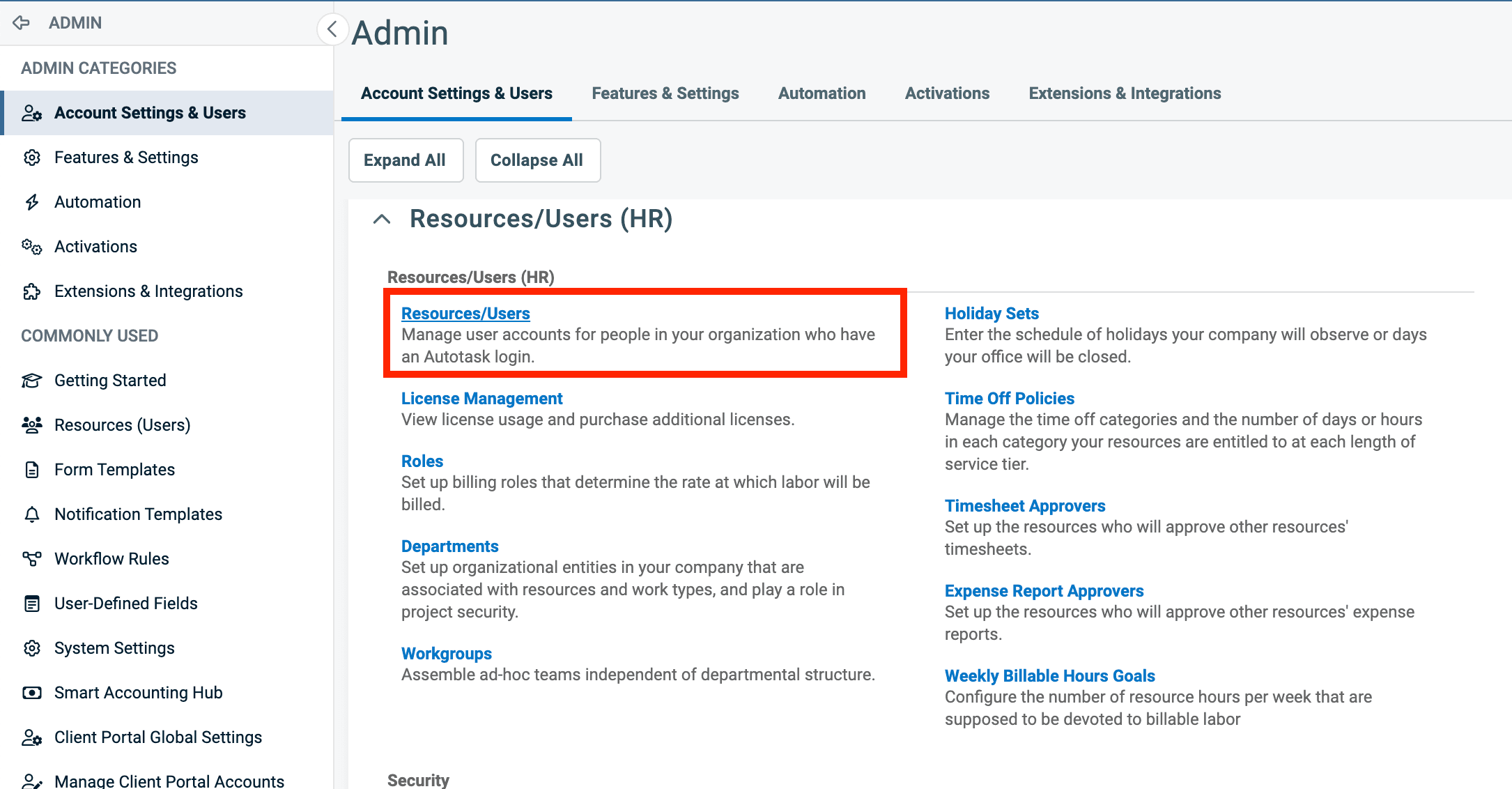
Open Admin > Account Settings & Users > Resources/Users (HR), then select Resources/Users.
-
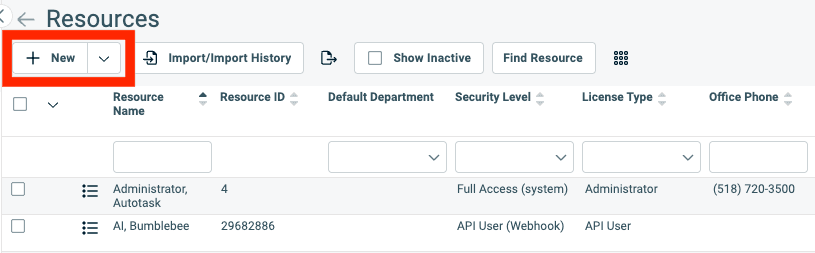
Click + New and select New API User.
-
Enter the API user details and assign the copied Bumblebee security level.
-
Generate and immediately copy the Key and Secret. The Secret is shown only once.
-
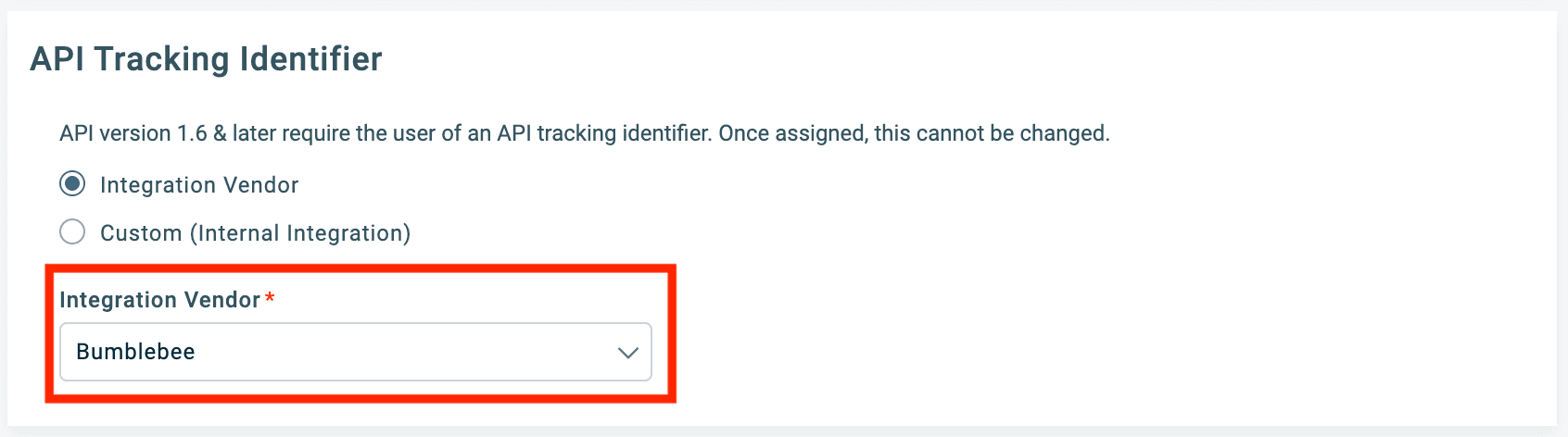
Under API Tracking Identifier, select Integration Vendor and choose Bumblebee. You do not need to copy an integration code.
-
Save the API user.
Configure in Bumblebee
- Go to the Integrations page in Bumblebee
- Click on Autotask
- Enter your Autotask credentials:
- API Username
- Secret
- Zone — optional, see below
- API Integration Code — optional, see below
- Click Test Connection to verify
- Save the configuration
Leave Zone blank. Autotask publishes a public lookup that maps an API
username to the zone hosting its account, so Bumblebee detects your zone from
the Username when you save your credentials. Fill the field in only if you
need to pin a specific zone — for example 5 for ww5.autotask.net. A zone
you enter is kept as-is, as is one saved before this field became optional.
If Autotask cannot place your Username, saving fails with a message saying so — that almost always means a typo in the Username rather than a problem with the zone.
Leave API Integration Code blank unless you set this integration up before Bumblebee appeared in the Autotask vendor dropdown. The tracking identifier names the Bumblebee integration rather than your account, so Bumblebee supplies its own.
If your API user was configured with a Custom (Internal Integration) identifier, copy that code from Autotask and paste it into the field — a custom identifier only works inside the Autotask database that created it, so Bumblebee cannot connect without it. A tracking identifier cannot be changed once assigned, so moving to the vendor identifier means creating a new API user.
Available Tools
Resources
- get_owner_resource_id_by_user_email - Get the owner resource ID for a given user email. Required: user_email (str)
- list_employee_resources - List employee resources (engineers/staff) in Autotask. Optional: is_active (bool), max_records (int), max_pages (int), response_filter (str)
Tickets
- get_ticket - Get complete ticket information by ticket ID. Returns raw JSON response from Autotask API. Required: ticket_id (int)
- get_ticket_by_ticket_number - Get ticket by ticket number (e.g., T20240101.0001). Required: ticket_number (str)
- list_tickets - List tickets. Returns raw JSON response from Autotask API. Optional: company_id (int), status (int), queue_id (int), from_date (str), to_date (str), max_records (int), max_pages (int), response_filter (str)
- update_ticket - Update an existing ticket in Autotask. Required: ticket_id (int). Optional: title (str), status (int), priority (int), issue_type (int), sub_issue_type (int), queue_id (int), description (str), due_date_time (str), estimated_hours (float), assigned_resource_id (int), assigned_resource_role_id (int), contract_id (int), service_level_agreement_id (int)
- list_ticket_notes_by_ticket_id - Get ticket notes by ticket ID. Returns raw JSON response from Autotask API. Required: ticket_id (int). Optional: response_filter (str)
- post_ticket_note - Create a new note on a ticket. Required: ticket_id (int), description (str), note_type (int), publish (int). Optional: title (str)
- get_ticket_charges_by_ticket_id - Get ticket charges by ticket ID. Returns raw JSON response from Autotask API. Required: ticket_id (int)
- list_ticket_charges - List ticket charges with optional filters. Optional: ticket_id (int), charge_type (str), max_records (int), max_pages (int), response_filter (str)
- get_entity_field_information - Get field information for a specific entity field in Autotask. Required: entity (str), field_name (str)
Contacts
- get_contact - Get complete contact information by contact ID. Returns raw JSON response from Autotask API. Required: contact_id (int)
- list_contacts - List contacts. Returns raw JSON response from Autotask API. Optional: company_id (int), email_address (str), is_active (bool), max_records (int), max_pages (int), response_filter (str)
- create_contact - Create a new contact in Autotask. Required: first_name (str), last_name (str), company_id (int). Optional: email_address (str), phone (str), mobile_phone (str), title (str), active (int)
- update_contact - Update an existing contact in Autotask. Required: contact_id (int), company_id (int). Optional: first_name (str), last_name (str), email_address (str), phone (str), mobile_phone (str), title (str), active (int)
Companies
- get_company - Get complete company information by company ID. Returns raw JSON response from Autotask API. Required: company_id (int)
- list_companies - List companies. Returns raw JSON response from Autotask API. Optional: company_name (str), company_type (int), is_active (bool), max_records (int), max_pages (int), response_filter (str)
- create_company - Create a new company in Autotask. Required: company_name (str), company_type (int), phone (str), owner_resource_id (int). Optional: address1 (str), city (str), state (str), postal_code (str), country (str)
- update_company - Update an existing company in Autotask. Required: company_id (int). Optional: company_name (str), company_type (int), phone (str), address1 (str), city (str), state (str), postal_code (str), country (str)
- get_company_notes_by_company_id - Get company notes by company ID. Returns raw JSON response from Autotask API. Required: company_id (int)
Opportunities
- get_opportunity - Get complete opportunity information by opportunity ID. Returns raw JSON response from Autotask API. Required: opportunity_id (int)
- list_opportunities - List opportunities. Returns raw JSON response from Autotask API. Optional: company_id (int), max_records (int), max_pages (int), response_filter (str)
- create_opportunity - Create a new opportunity in Autotask. Required: title (str), company_id (int), stage (int), status (int), amount (float), cost (float), start_date (str), owner_resource_id (int), projected_close_date (str), probability (int). Optional: use_quote_totals (bool)
- update_opportunity - Update an existing opportunity in Autotask. Required: opportunity_id (int). Optional: title (str), stage (int), status (int), amount (float), cost (float), start_date (str), projected_close_date (str), owner_resource_id (int), probability (int), use_quote_totals (bool)
Products
- get_product_by_id - Get complete product information by product ID. Returns raw JSON response from Autotask API. Required: product_id (int)
- list_products - List products with optional filters. Optional: is_active (bool), product_name (str), max_records (int), max_pages (int), response_filter (str)
- get_product_notes_by_id - Get product notes by product ID. Returns raw JSON response from Autotask API. Required: product_id (int)
Projects
- get_project_by_id - Get complete project information by project ID. Returns raw JSON response from Autotask API. Required: project_id (int)
- list_projects - List projects with optional filters. Optional: company_id (int), status (int), max_records (int), max_pages (int), response_filter (str)
- get_project_notes_by_id - Get project notes by project ID. Returns raw JSON response from Autotask API. Required: project_id (int)
Service Calls
- get_service_call_by_id - Get complete service call information by service call ID. Returns raw JSON response from Autotask API. Required: service_call_id (int)
- list_service_calls - List service calls with optional filters. Optional: company_id (int), status (int), is_complete (int), max_records (int), max_pages (int), response_filter (str)
- create_service_call - Create a new service call in Autotask. Required: company_id (int), start_date_time (str), end_date_time (str). Optional: description (str), status (int), is_complete (int), company_location_id (int)
- update_service_call - Update an existing service call in Autotask. Required: service_call_id (int). Optional: company_id (int), start_date_time (str), end_date_time (str), description (str), status (int), is_complete (int), company_location_id (int), canceled_by_resource_id (int), canceled_date_time (str)
Time Entries
- get_time_entry_by_id - Get complete time entry information by time entry ID. Returns raw JSON response from Autotask API. Required: time_entry_id (int)
- list_time_entries - List time entries with optional filters. Optional: resource_id (int), ticket_ids (List[int]), task_ids (List[int]), from_date (str), to_date (str), max_records (int), max_pages (int), response_filter (str)
- list_time_entries_for_tickets - List all time entries on tickets for a given company, with server-side aggregation. Required: company_id (int). Optional: from_date (str), to_date (str), max_pages (int)
- list_time_entries_for_projects - List all time entries on project tasks for a given company, with server-side aggregation. Required: company_id (int). Optional: from_date (str), to_date (str), max_pages (int)
- create_time_entry - Create a new time entry in Autotask. Required: resource_id (int), role_id (int), summary_notes (str). Optional: date_worked (str), start_date_time (str), end_date_time (str), hours_worked (float), ticket_id (int), task_id (int), is_non_billable (bool), show_on_invoice (bool), billing_code_id (int), contract_id (int)
- update_time_entry - Update an existing time entry in Autotask. Required: time_entry_id (int). Optional: resource_id (int), role_id (int), summary_notes (str), date_worked (str), start_date_time (str), end_date_time (str), hours_worked (float), ticket_id (int), task_id (int), is_non_billable (bool), show_on_invoice (bool), billing_code_id (int), contract_id (int)
Appointments
- get_appointment_by_id - Get complete appointment information by appointment ID. Returns raw JSON response from Autotask API. Required: appointment_id (int)
- list_appointments - List appointments with optional filters. Optional: resource_id (int), max_records (int), max_pages (int), response_filter (str)
- create_appointment - Create a new appointment in Autotask. Required: resource_id (int), start_date_time (str), end_date_time (str), title (str). Optional: description (str)
- update_appointment - Update an existing appointment in Autotask. Required: appointment_id (int). Optional: resource_id (int), start_date_time (str), end_date_time (str), title (str), description (str)
Contracts
- get_contract_details - Get complete contract details including all child resources. Required: contract_id (int)
- list_contracts - List contracts with optional filters. Optional: company_id (int), status (int), contract_type (int), max_records (int), max_pages (int), response_filter (str)
- list_contract_charges - List contract charges across contracts with optional filters. Optional: contract_id (int), is_billed (bool), max_records (int), max_pages (int), response_filter (str)
Invoices & Billing
- get_invoice - Get invoice details by invoice ID. Required: invoice_id (int)
- list_invoices - List invoices with optional filters. Optional: company_id (int), from_date (str), to_date (str), max_records (int), max_pages (int), response_filter (str)
- list_billing_items - List billing items (the bridge between work and invoices). Optional: contract_id (int), invoice_id (int), is_invoiced (bool), company_id (int), from_date (str), to_date (str), max_records (int), max_pages (int), response_filter (str)
- get_billing_code - Get billing code (allocation code) details by ID. Required: billing_code_id (int)
- list_billing_codes - List billing codes (allocation codes) with optional filters. Optional: is_active (bool), max_records (int), max_pages (int), response_filter (str)
Configuration Items (Devices)
- get_configuration_item - Get complete configuration item (device) information by ID. Required: configuration_item_id (int)
- list_configuration_items - List configuration items (devices) with optional filters. Optional: company_id (int), is_active (bool), configuration_item_type (int), serial_number (str), reference_title (str), product_id (int), max_records (int), max_pages (int), response_filter (str)
- create_configuration_item - Create a new configuration item (device) in Autotask. Required: company_id (int), product_id (int), configuration_item_type (int). Optional: is_active (bool), reference_title (str), reference_number (str), serial_number (str), install_date (str), location (str), notes (str), contact_id (int), contract_id (int), parent_configuration_item_id (int), warranty_expiration_date (str), daily_cost (float), monthly_cost (float), hourly_cost (float), per_use_cost (float), setup_fee (float), number_of_users (float), configuration_item_category_id (int)
- update_configuration_item - Update an existing configuration item (device) in Autotask. Required: configuration_item_id (int). Optional: configuration_item_type (int), product_id (int), is_active (bool), reference_title (str), reference_number (str), serial_number (str), install_date (str), location (str), notes (str), contact_id (int), contract_id (int), parent_configuration_item_id (int), warranty_expiration_date (str), daily_cost (float), monthly_cost (float), hourly_cost (float), per_use_cost (float), setup_fee (float), number_of_users (float), configuration_item_category_id (int)
- get_configuration_item_notes - Get notes for a configuration item (device) by ID. Required: configuration_item_id (int)
Webhooks
- create_webhook - Create a new webhook for Autotask entity events, or real-time notifications when entities are created, updated, or deleted in Autotask. Required: entity_type (str), name (str), webhook_url (str), deactivation_url (str), secret_key (str). Optional: is_active (bool), is_subscribed_to_create_events (bool), is_subscribed_to_update_events (bool), is_subscribed_to_delete_events (bool), send_threshold_exceeded_notification (bool)
- subscribe_webhook_field - Subscribe a webhook to specific field changes. At least one field must be subscribed for update events to work. Required: entity_type (str), webhook_id (int), field_name (str). Optional: is_subscribed_field (bool), is_display_always_field (bool)
- list_webhooks - List all registered webhooks for an entity type. Required: entity_type (str). Optional: max_pages (int), response_filter (str)
- delete_webhook - Delete a webhook. Required: entity_type (str), webhook_id (int)
Support
For additional help with Autotask integration:
- Contact Bumblebee support
- Refer to Autotask API documentation
Augmentt
Connect Bumblebee with Augmentt to query M365 security reporting for your customers — MFA, security posture, threats, summary reports, and Microsoft license renewals
Axcient
Connect Bumblebee with Axcient x360Cloud and x360Recover to read SaaS backup status, restore points, vaults, devices, and jobs