
Halo
Overview
The Halo integration allows you to automate service desk operations, asset management, and customer data synchronization between Bumblebee and your Halo PSA/ITSM platform.
Prerequisites & Setup
Before setting up the Halo integration, you need:
- An active Halo PSA or HaloITSM instance.
- Administrator access to configure integrations.
1. Create an API Application in Halo
-
Log in to your Halo instance.
-
Navigate to Configuration > Integrations > Halo API.
-
Click View Applications and then New.
-
Configure the application:
- Application Name: "Bumblebee"
- Authentication Method: Client ID and Secret (OAuth2)
- Login Type: Agent (Select a dedicated service agent)
-
Copy the Client ID and Client Secret for use in Bumblebee.
-
Open the Permissions tab and scroll through the complete list.
-
Select every permission whose name begins with
read:. Leave everyedit:,editMine:,admin:, andallpermission unchecked, then save the application.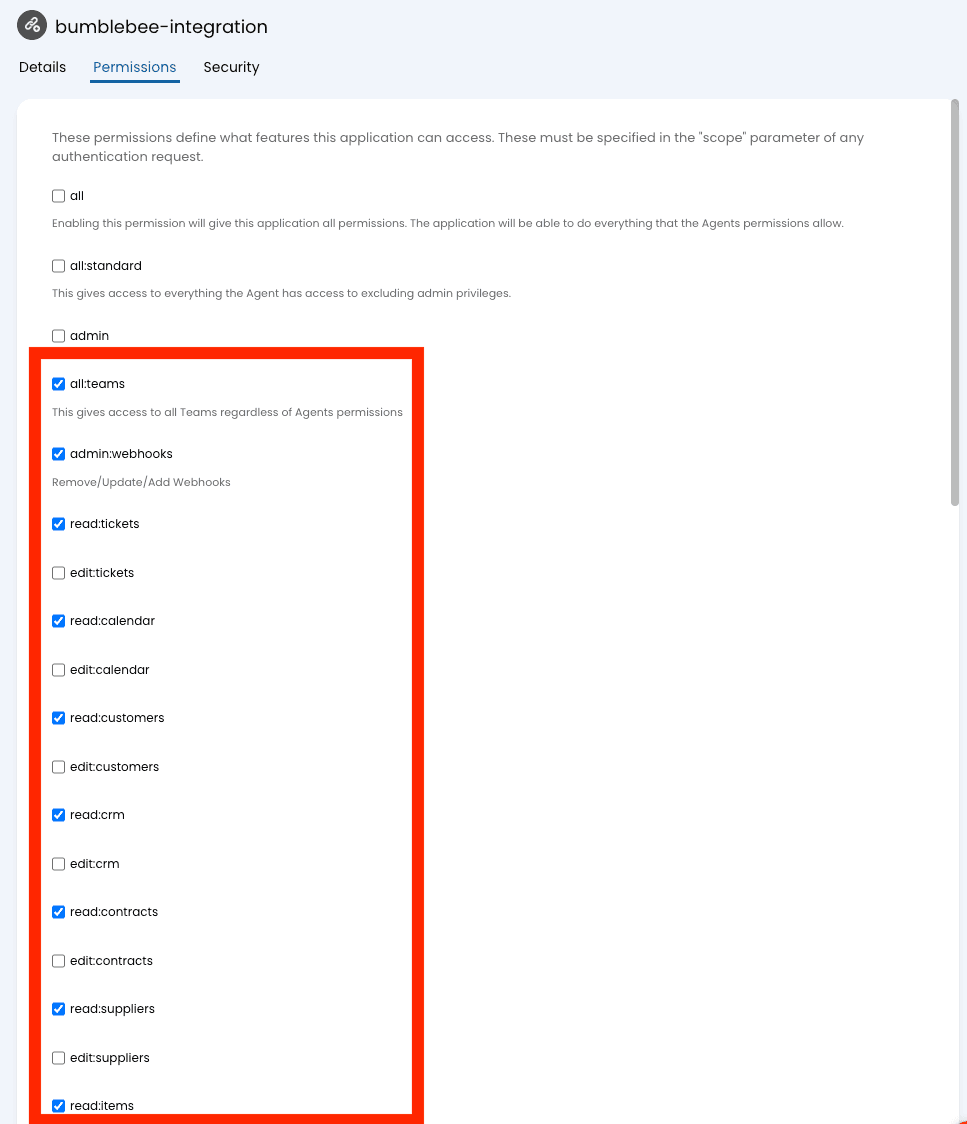
The screenshot shows where the scopes appear. Some adjacent write permissions
are visibly selected, but they are not part of Bumblebee's recommendation;
select only the read: entries.
2. Find Your Base URL
Your base URL is the full URL of your Halo instance (e.g., https://acme.haloitsm.com).
Configure in Bumblebee
- Go to the Integrations page in Bumblebee.
- Click on Halo.
- Enter your Client ID, Client Secret, and Base URL.
- Save the configuration.
Available Tools
Tickets
- list_tickets - List tickets from HaloPSA with optional filters. Optional: client_id (int), site_id (int), user_id (int), agent_id (int), status_id (int), ticket_type_id (int), priority_id (int), count (int), search (str), open_only (bool)
- get_ticket - Get a specific ticket by ID from HaloPSA. Required: ticket_id (int)
- create_ticket - Create a new ticket in HaloPSA. Required: summary (str), details (str). Optional: client_id (int), site_id (int), user_id (int), agent_id (int), ticket_type_id (int), priority_id (int), status_id (int), category_1 (str)
- update_ticket - Update an existing ticket in HaloPSA. Required: ticket_id (int). Optional: summary (str), details (str), client_id (int), site_id (int), user_id (int), agent_id (int), ticket_type_id (int), priority_id (int), status_id (int), category_1 (str)
Ticket Actions
- list_actions - List actions (notes/updates) for a specific ticket. Required: ticket_id (int). Optional: count (int)
- create_action - Create a new action (note/update) on a ticket. Required: ticket_id (int), note (str). Optional: outcome (str), who_agentid (int), hiddenfromuser (bool)
Clients
- list_clients - List clients (customers) from HaloPSA with optional filters. Optional: count (int), search (str), toplevel_only (bool), is_active (bool)
- get_client - Get a specific client by ID from HaloPSA. Required: client_id (int)
- create_client - Create a new client in HaloPSA. Required: name (str). Optional: email (str), phone_number (str), website (str), main_site_name (str)
- update_client - Update an existing client in HaloPSA. Required: client_id (int). Optional: name (str), email (str), phone_number (str), website (str)
Sites
- list_sites - List sites from HaloPSA with optional filters. Optional: client_id (int), count (int), search (str)
- get_site - Get a specific site by ID from HaloPSA. Required: site_id (int)
Users
- list_users - List users (contacts/end-users) from HaloPSA with optional filters. Optional: client_id (int), site_id (int), count (int), search (str), is_active (bool)
- get_user - Get a specific user (contact/end-user) by ID from HaloPSA. Required: user_id (int)
Agents
- list_agents - List agents (technicians) from HaloPSA with optional filters. Optional: count (int), search (str), is_enabled (bool)
- get_agent - Get a specific agent (technician) by ID from HaloPSA. Required: agent_id (int)
Assets
- list_assets - List assets (devices/configuration items) from HaloPSA with optional filters. Optional: client_id (int), site_id (int), count (int), search (str), assetgroup_id (int)
- get_asset - Get a specific asset by ID from HaloPSA. Required: asset_id (int)
Invoices
- list_invoices - List invoices from HaloPSA with optional filters. Optional: client_id (int), count (int), search (str)
- get_invoice - Get a specific invoice by ID from HaloPSA. Required: invoice_id (int)
Contracts
- list_contracts - List contracts/recurring invoices from HaloPSA with optional filters. Optional: client_id (int), count (int), search (str)
- get_contract - Get a specific contract by ID from HaloPSA. Required: contract_id (int)
Opportunities
Opportunities are a CRM ticket type in HaloPSA and include sales fields such as pipeline_stage_name, oppvalue, and oppconversionprobability alongside the standard ticket fields.
- list_opportunities - List sales opportunities from HaloPSA with optional filters. Optional: client_id (int), page (int)
- get_opportunity - Get a specific opportunity by ID from HaloPSA. Required: opportunity_id (int)
- search_opportunities - Search opportunities by text query. Required: query (str). Optional: page (int)
Configuration
- list_ticket_types - List all ticket types configured in HaloPSA. Optional: count (int)
- list_priorities - List all ticket priorities configured in HaloPSA. Optional: count (int)
- list_statuses - List all statuses configured in HaloPSA. Optional: count (int), type (str)
- list_categories - List all ticket categories configured in HaloPSA. Optional: count (int), type (str)
- list_appointment_types - List appointment types configured in HaloPSA. Optional: show_all (bool), count (int)
Reference: Halo API Setup Guide